How to Build a Content Strategy Around Audience Questions
Turn real audience questions into better priorities, stronger briefs, and content that answers what people actually need.

|
Posted: September 17, 2026 |
Audience questions are useful because they show where people are getting stuck.
They can tell you what someone doesn't understand, what they're trying to compare, what they need before making a decision, or what your existing content failed to explain. The harder part is deciding what to do with that information.
A list of questions can look like a content strategy when it's really just a backlog.
If every question from Search Console, Reddit, a support ticket, a sales call, or a keyword tool becomes an article idea, you'll probably end up publishing a lot of pages that overlap with each other or answer problems you had already covered somewhere else.
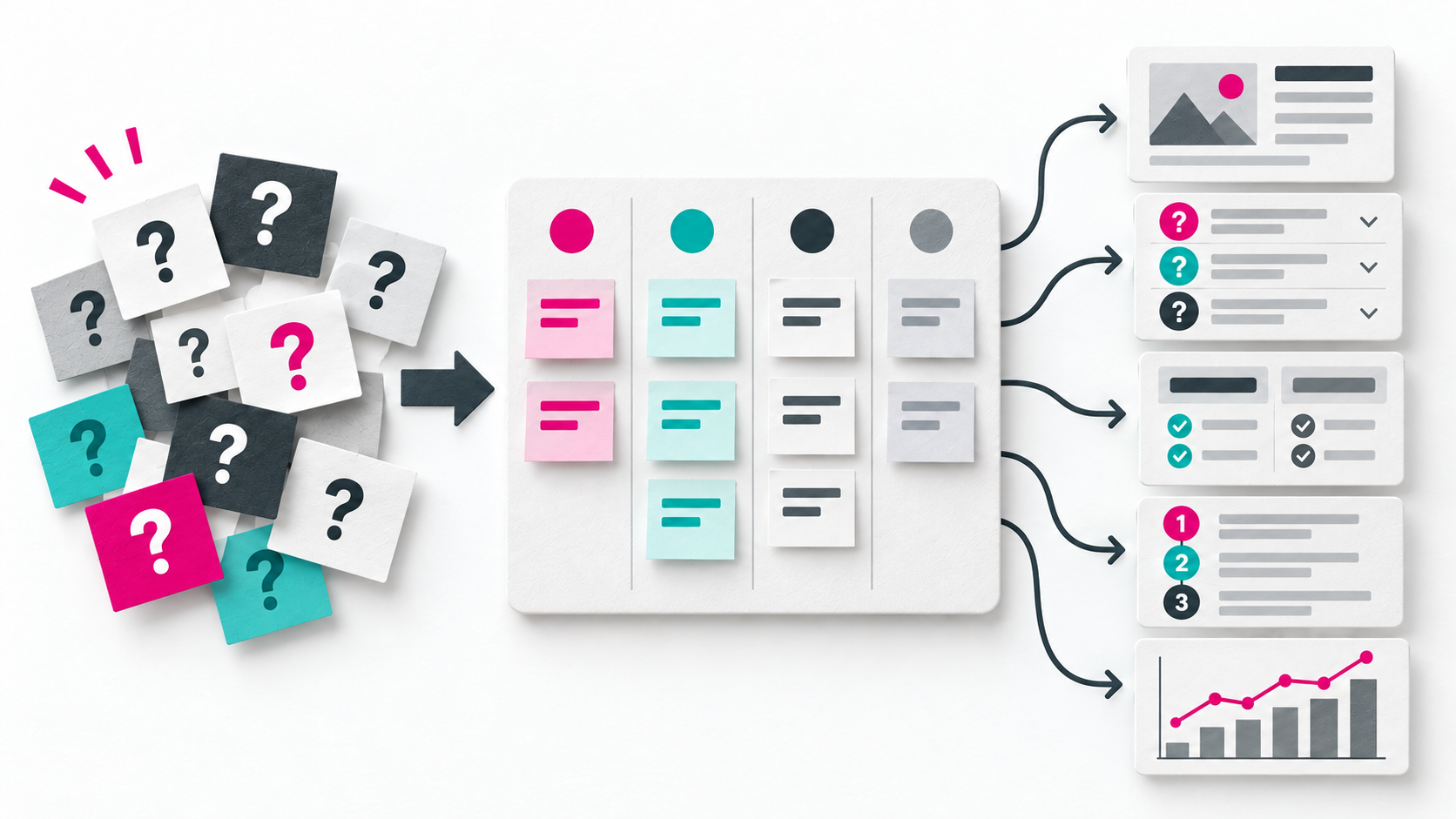
A question-led content strategy needs another layer. You have to collect the questions, work out what people actually need from the answers, decide which ones matter, and then choose whether the response should be a new article, an update, an FAQ, a comparison, a tutorial, or nothing at all.
Start with questions from more than one place
Search data is an obvious starting point, but it's only one view of the audience.
Google Search Console's Performance report shows which queries are bringing people to your site and which searches are generating impressions. Google also points out some important limitations: anonymized queries aren't shown, and the interface doesn't expose every query associated with a site.
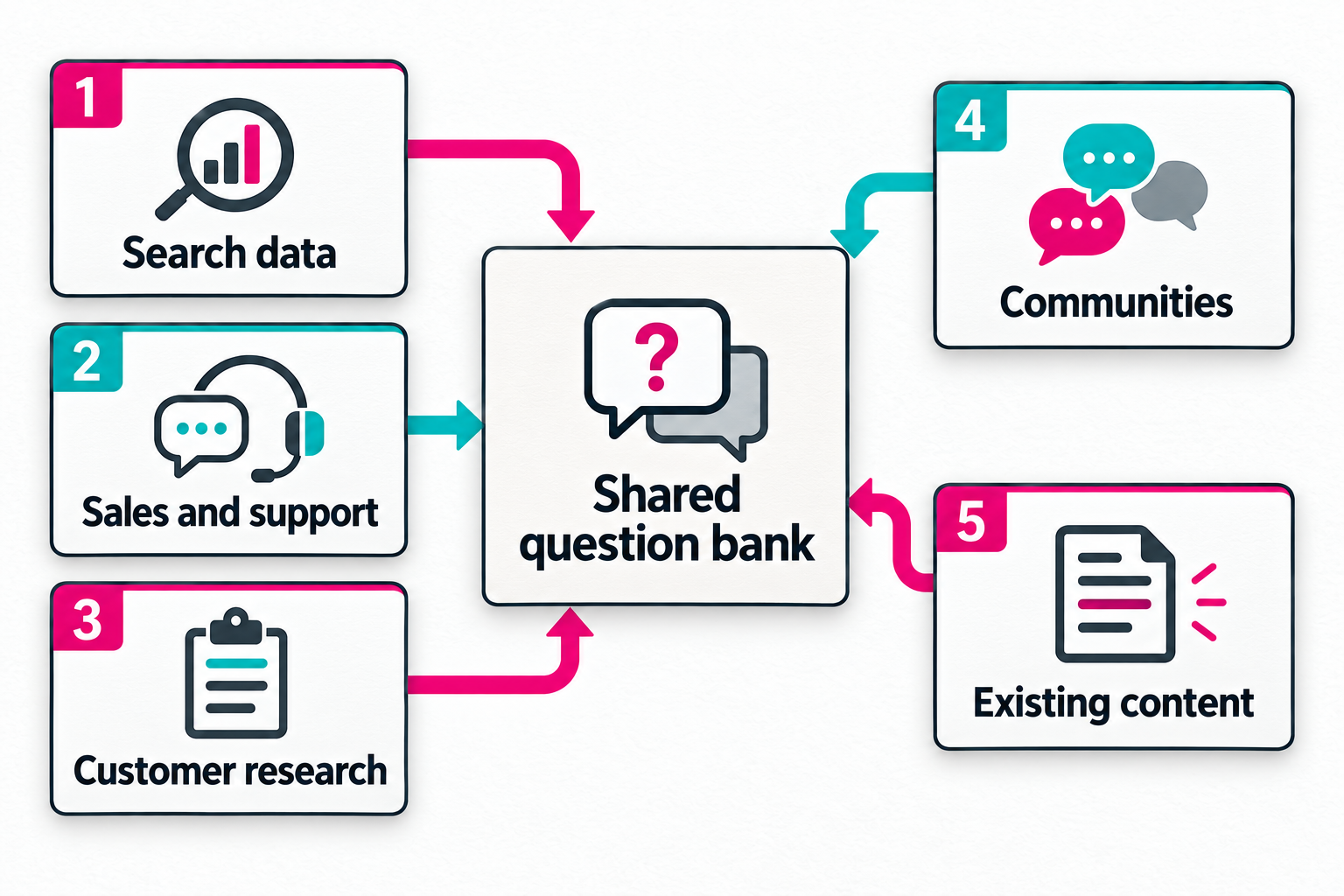
That's one reason a useful question bank should draw from several places:
- Google Search Console
- Internal site search
- Customer support tickets
- Sales calls and demos
- Contact forms and chat logs
- Customer interviews
- Surveys
- Reviews
- Reddit and specialist forums
- Social media comments
- Competitor content
- AI prompts and follow-up questions
- Questions people ask after reading your existing content
Some of those sources are better at exposing problems than keywords are.
A search query might tell you that someone wants "email marketing software pricing." A sales call can tell you why pricing matters to them, what they're comparing it against, whether they care about monthly contracts, and what would make the cost difficult to justify.
Content Marketing Institute recently made a similar point in its discussion of using audience data for content planning. Sales transcripts, recurring customer questions, community discussions, CRM information, and reasons people decide not to buy can all contain useful content signals. The bigger operational problem is often getting those signals from sales, support, or analytics into the hands of the people deciding what gets published.
For a content team, that probably means having a boring but reliable collection process. A shared sheet or database that actually gets used is more valuable than an elaborate audience research system that gets reviewed twice a year.
Keep the question in its original context
Don't turn every question into a keyword as soon as you collect it.
Take this example:
"Does this software integrate with Shopify?"
Reducing that to "Shopify integration" loses quite a bit.
The person asking probably already knows what the software does. They're checking whether it fits an existing setup. They may be much further along in their decision than someone asking "What is inventory management software?"
Both questions could appear under the same broad topic in a keyword tool. They shouldn't automatically lead to the same content.
When you record a question, keep some context with it:
- What was actually asked?
- Where did the question come from?
- Who seems to be asking it?
- What are they trying to accomplish?
- Do we already answer it?
- What's missing from the current answer?
- What did they ask next?
- Have we seen the same underlying issue elsewhere?
You won't know all of those things every time. That's fine. The useful part is resisting the urge to strip a real audience problem down to a search phrase before you've decided what it means.
Group questions by what the person is trying to do
Search intent is useful here, although the usual SEO categories can be pretty broad.
Ahrefs' search intent framework uses informational, commercial, transactional, and navigational intent as its starting categories. It also notes that individual queries can sit across several categories, which is where simple intent labels start to become less useful.
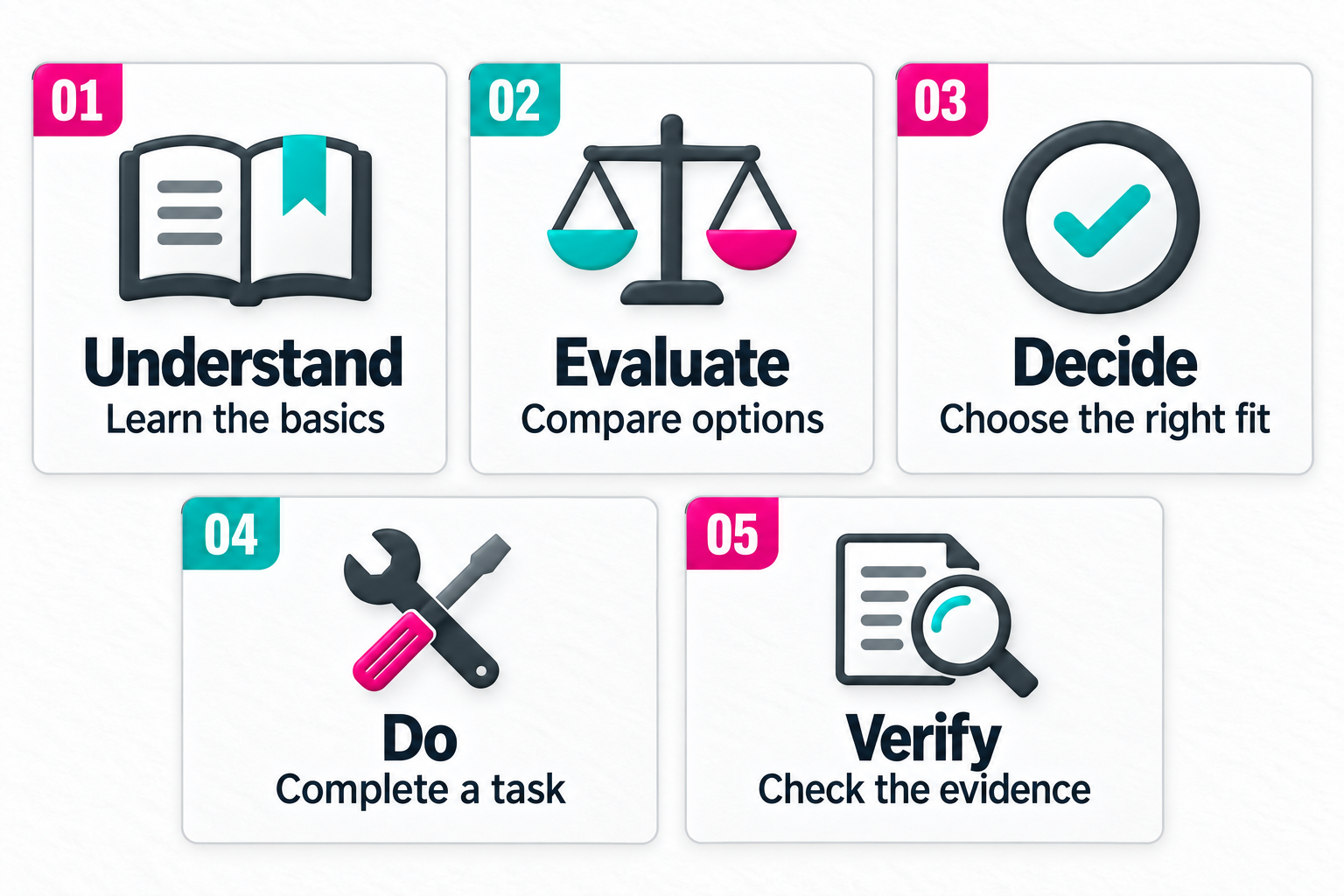
For editorial planning, I find it more useful to ask what job the answer needs to perform.
Understand
These are questions from someone trying to get their bearings.
"What is reactive marketing?" "How does email automation work?" "Why does this happen?"
Definitions, explanations, examples, diagrams, and introductory guides can all make sense. The important thing is matching the depth of the answer to the subject.
Evaluate
These questions appear once someone knows enough to start comparing approaches.
They might ask:
- What's the difference between these two options?
- What are the drawbacks?
- When does one approach work better?
- What alternatives should I consider?
- What happens in a specific use case?
A basic definition isn't much help at this stage. Comparisons, tradeoffs, evidence, limitations, examples, and case studies usually matter more.
Decide
Decision questions often become much more specific.
Someone wants to know the price, whether something fits their situation, whether it integrates with an existing system, how difficult implementation will be, or what they'll have to give up by choosing one option over another.
These questions can be commercially important, but they're also easy to miss if your content planning is heavily focused on broad informational keywords.
Do
These people already understand enough to attempt something.
They need instructions.
That might mean a setup guide, walkthrough, checklist, template, video, worked example, or troubleshooting article.
If someone's asking how to configure something, another 1,500-word explanation of why the subject matters probably isn't the answer they need.
Verify
Some questions are really requests for proof.
Where did that statistic come from? Is this still accurate? Who conducted the research? Does the claim apply to my market? When was this page updated?
In those cases, the content problem may be weak sourcing or stale information. Publishing another page won't necessarily help.
These groups don't need to become permanent labels in your CMS. They're mainly there to stop very different audience needs from being flattened into one topic bucket.
Check the questions against content you already have
Before adding anything to the editorial calendar, find out whether the question is actually unanswered. A content gap doesn't always mean a topic is entirely missing, it often means your existing page leaves out what the reader actually wants to know.
Use this four point diagnostic to identify where the breakdown is happening:
- Coverage: Do we answer this specific question anywhere on the site?
- Completeness: Does the existing answer go far enough? (e.g., Mentioning a feature without explaining the setup process.)
- Intent: Does the answer fit the user's goal? (e.g., A general CRM guide doesn't help someone trying to evaluate a specific integration.)
- Accuracy & Evidence: Is the information still correct, and are the claims supported by visible proof?
Remember that finding a question doesn't create an obligation to publish. If the query is too obscure, outside your expertise, or already answered well elsewhere, the best action is to do nothing.
Prioritize the questions that are actually worth answering
Once you start gathering questions from several places, you'll have too many.
That's normal. The useful part of the strategy is deciding which ones deserve attention.
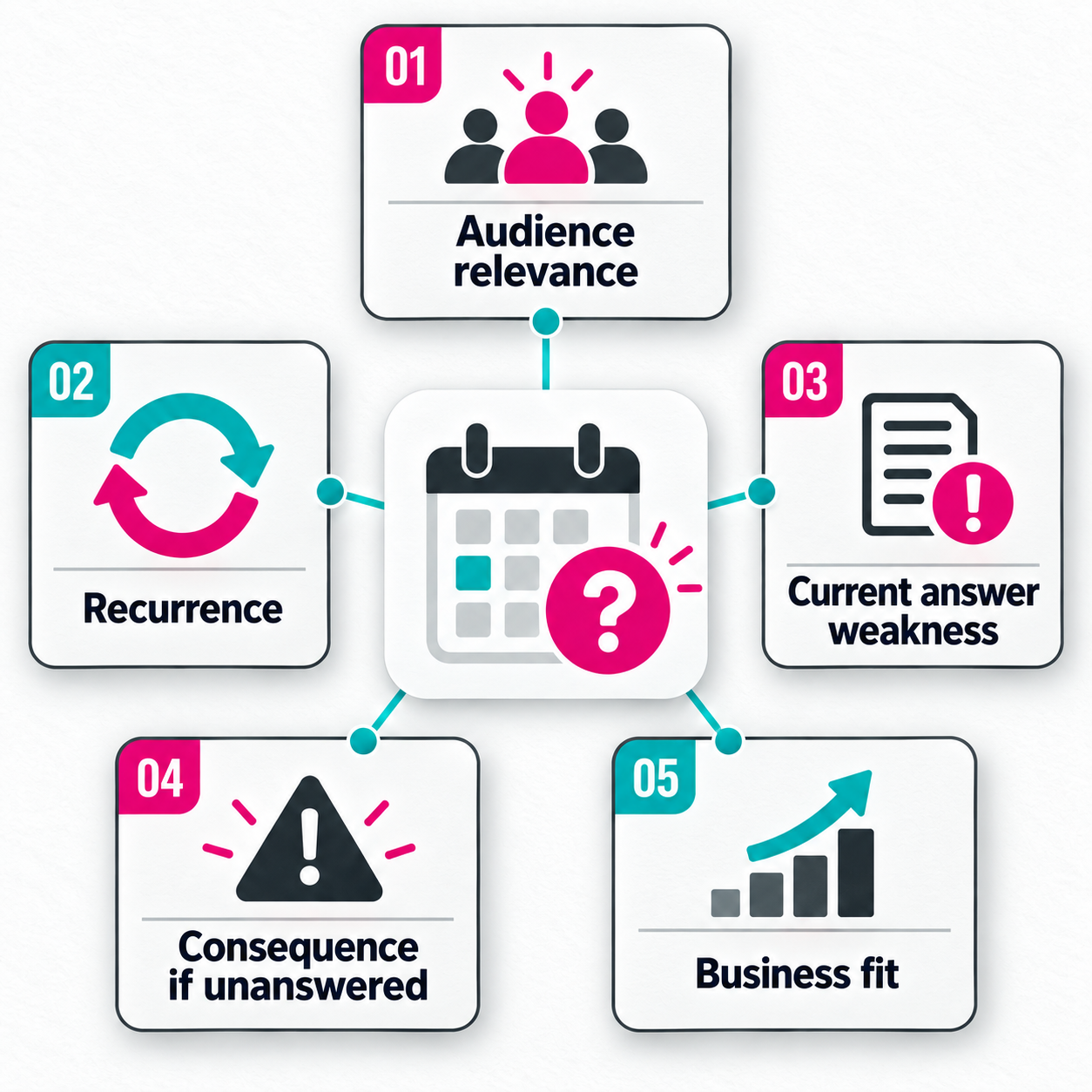
1. Does our audience actually care?
This is the first filter.
Google's people-first content guidance asks whether a site has an existing or intended audience that would find the content useful and whether the site has a clear primary purpose. Those are sensible boundaries for editorial planning as well.
A question being searchable isn't enough.
2. How often does the problem appear?
Look for recurrence across different sources.
If the same issue turns up in Search Console, two sales calls, support tickets, and a Reddit discussion, that's much more interesting than finding the phrase once in a keyword export.
The wording won't always match. You're looking for the same unresolved need.
3. How weak is our current answer?
There is a big difference between "this paragraph could use another example" and "people can't find the information they need to decide whether our product works for them."
The second deserves more attention.
4. What happens if the question stays unanswered?
Some gaps are mildly annoying. Others stop someone from completing a task or making a decision.
Pricing, compatibility, implementation requirements, evidence, limitations, and suitability can have much more practical weight than another broad definition of a topic you already cover well.
5. Does answering it make sense for us?
This is where editorial judgment matters.
Can you answer it credibly? Does it fit the subjects you want to be known for? Is it connected to your product, service, expertise, or audience?
If the answer is mostly no, search volume shouldn't rescue it.
You can turn those factors into a scoring system if you're dealing with hundreds of questions, but I'd keep the scoring simple. Once the model becomes more complicated than the editorial judgment it's supposed to support, it stops helping.
Don't assume the answer needs another article
One of the fastest ways to make a content library messy is to treat every question as a brand-new URL.
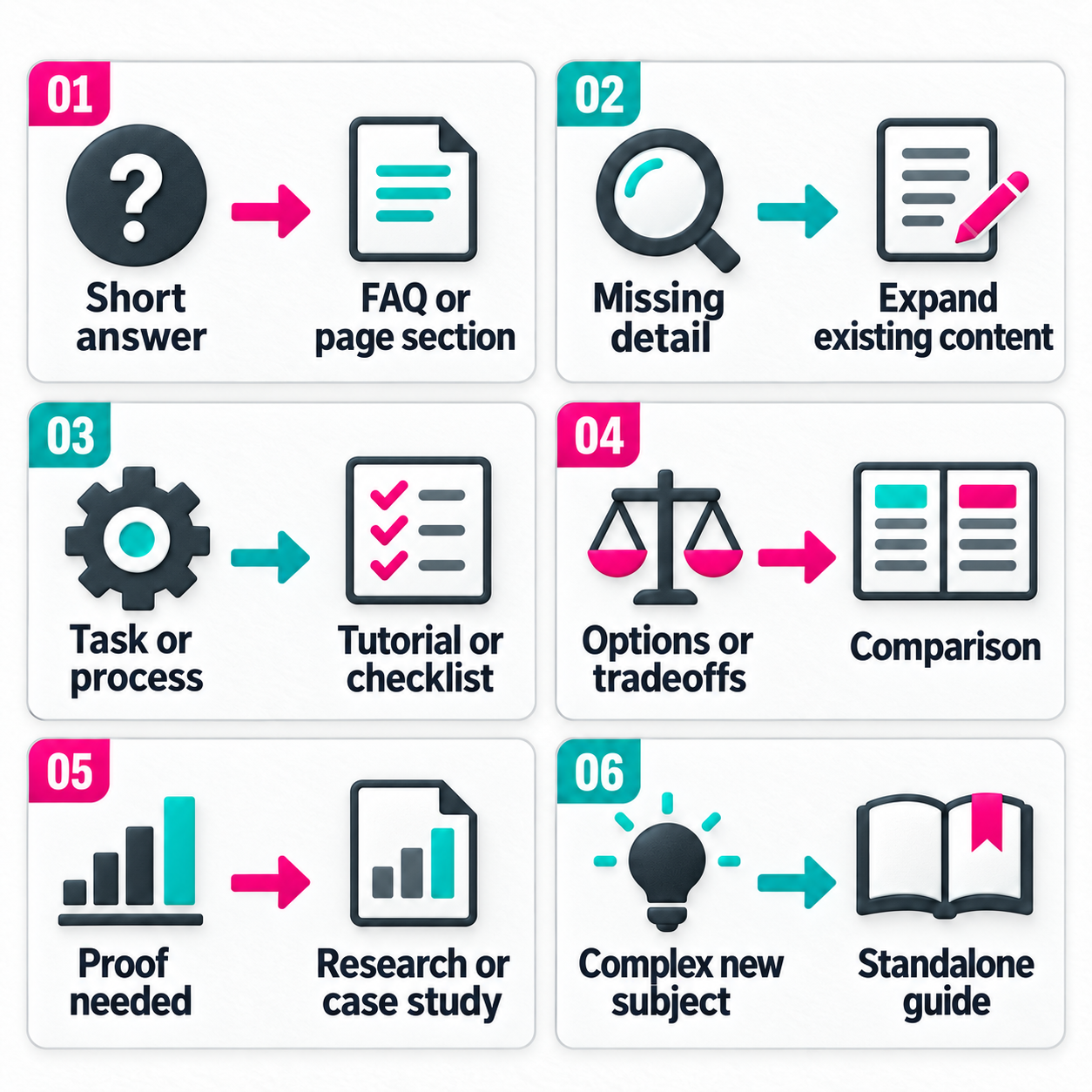
The amount and type of information required should dictate the format. Instead of defaulting to another 1,500-word post, a pertinent question might be better served by:
- An added paragraph or rewritten section on an existing page
- A comparison table
- A quick tutorial or checklist
- A video demonstration
Users frequently bounce between multiple sources because the first page they read "mostly" answers their question but stops too early.
If someone asks, "What time do you close?", they need a short, direct sentence. If they ask, "Which plan makes sense for a 20-person agency managing several client brands?", they need pricing, workflow examples, and limit comparisons to verify if the product fits. Match the format to the actual depth of the problem.
Follow-up questions are often more important than the first question
Broad questions tell you the subject. Follow-up questions often tell you where the real problem is.
Someone researching a product might start with:
- What does this product do?
- Does it work with Shopify?
- How much does it cost?
- Is there a limit on the number of products?
- How does it compare with the tool we're already using?
- How difficult is migration?
The first question gets them into the subject. The later questions are closer to the actual decision.
ContentEngine's survey found that among respondents whose initial information was incomplete, 23.5% changed their search wording or asked a follow-up question. Another 32.5% checked a different source immediately.
That's useful research material for content teams.
If the same follow-up keeps appearing, look at the page people are reading before they ask it. The problem may already be sitting inside content you own.
Sometimes the fix is a new article. Sometimes three additional paragraphs on an existing page would do a better job.
Turn the strongest questions into briefs
Once you've decided a question deserves work, the brief should keep the original audience problem visible.
Otherwise the process tends to drift.
A question such as "Will this work for a small agency managing several brands?" gets collected from a sales call. By the time it reaches a writer, the assignment has somehow become "Write 1,800 words targeting 'marketing automation for agencies.'"
The original question was more useful.
A practical brief can include:
Primary audience question: Write down what the person actually wants to know.
Audience and situation: Who is asking? What are they already likely to understand? What are they trying to do?
Intent: Are they trying to understand, evaluate, decide, do something, or verify information?
Existing coverage: Where do you currently address the subject?
Gap: What specifically is missing? Be precise. "We need more content about integrations" isn't especially useful. "Our product page lists Shopify as an integration but doesn't explain what data syncs or what setup requires" is.
Publishing decision: Are you creating something new, expanding an existing page, updating old information, consolidating overlapping content, or restructuring the answer?
Format: Article, FAQ, comparison, tutorial, video, report, product content, or another format.
Follow-up questions: What is somebody likely to need once the main question has been answered?
Evidence: What needs a source? Do you need product documentation, original research, screenshots, expert input, customer examples, or external data?
Internal links: Where should the reader go before or after this answer?
Success signals: What would make you think the change helped?
That last one doesn't have to mean rankings. A reduction in support questions, better engagement with a product page, more qualified sales conversations, or new search queries around more advanced questions can all tell you something.
Review what people ask after you publish
The question collection process shouldn't stop when the content goes live.
Go back to the same places you used to find the question.
Search Console can show whether the page is appearing for the searches you expected and whether new queries are starting to surface. Google specifically recommends examining the queries associated with pages when assessing Search performance.
Sales and support teams may also notice a change.
Maybe customers stop asking the original question. That's useful.
Maybe they start asking a more specific question. That's useful too. It can mean the content got them further before they needed help.
Comments, Reddit discussions, site searches, chat conversations, AI interactions, and customer interviews can all feed new questions back into the same collection system.
You don't need to rebuild the strategy every month. You need a review loop that's regular enough to catch patterns before the content library falls behind them.
Use questions to make publishing decisions, not just generate ideas
The point of collecting audience questions isn't to make sure the editorial calendar stays full.
Content teams rarely need help finding more things they could write about. The harder job is deciding what deserves to exist, what should be expanded, and what can safely be ignored.
Questions give you evidence for those decisions.
Some expose subjects you haven't covered. Others show that an existing page stops short of the information people actually need. Some point to missing proof or outdated details. Others tell you that the format is wrong for the task.
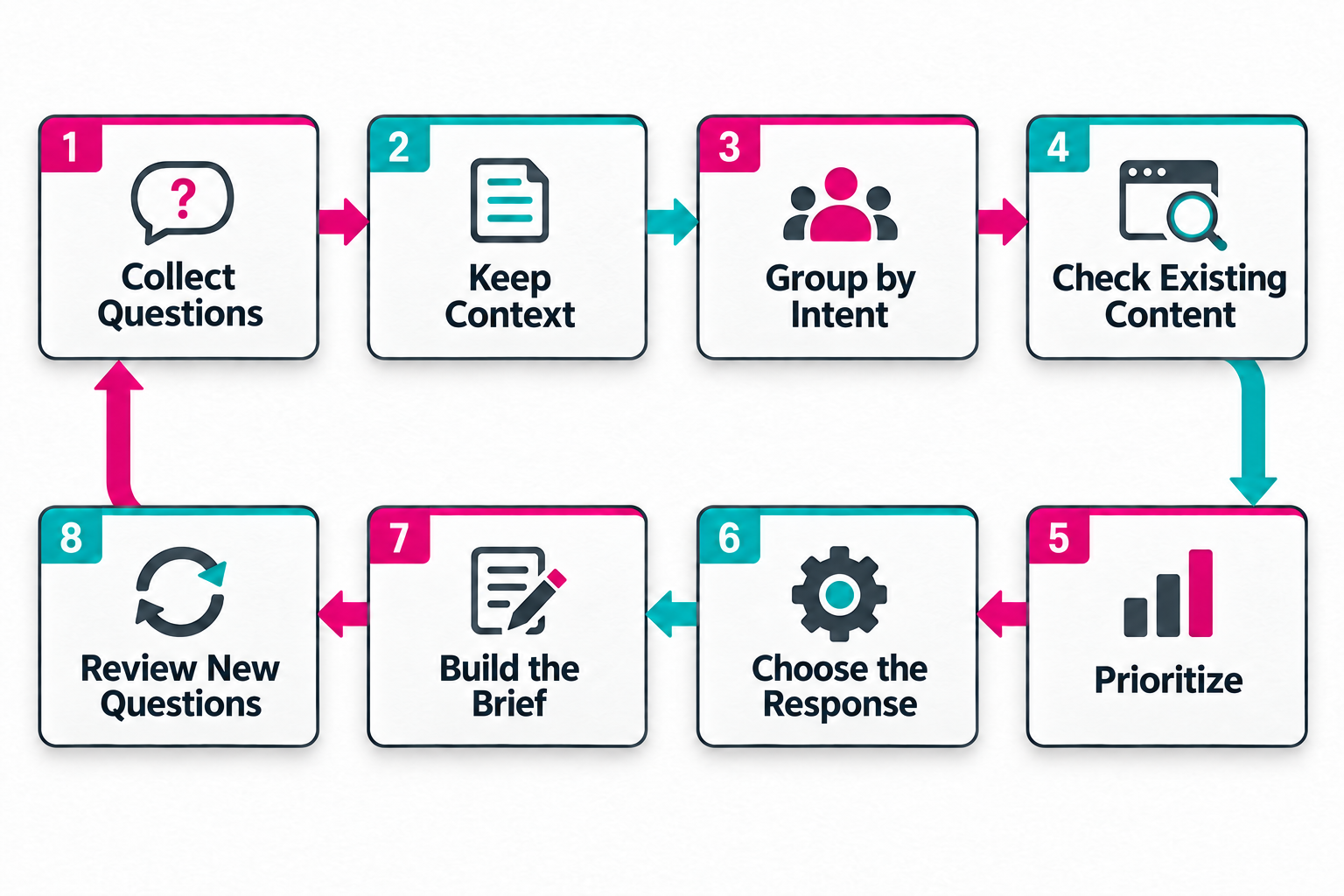
A useful workflow is fairly straightforward:
Collect the questions. Keep their context. Group them by what people are trying to accomplish. Compare them with what you already publish. Prioritize the meaningful gaps. Pick the format that fits the answer. Write the brief around the original need. Then watch what people ask next.
That gives audience questions a practical role in content strategy. They become evidence for deciding what to publish and what to fix.